Anthropic are really confident in Claude Code's auto mode, to the point that they are making it the default setting for new sessions in most Claude Code plans starting on …
Auto mode sounds less like security and more like outsourcing judgment to the same AI you’re supposedly trying to constrain. If users are bad at spotting malicious prompts, the answer shouldn’t be: great, let’s remove them from the loop entirely. That’s not safety. That’s automated permission laundering.
So if I remember correctly, what happens with auto mode is they run a second smaller LLM called the “classifier” to evaluate the tool uses of the main one.
I’ve used auto mode at work now for many months, and it approves most things because most things Claude does are reasonable.
Once or twice I have seen it reject Claude. I can’t remember the exact scenario, but I had asked Claude to diagnose an issue but not fix it yet, and when later on it tried to make the change the classifier rejected it, giving the reason that what it was trying to do did not match my request.
In my opinion, the trick to using auto mode safely here is to:
Commit and push your changes before handing over the reins (it rarely commits or pushes without you telling it to, especially if you have never asked in that session).
Don’t give it access to things it shouldn’t have access to or that can do significant damage
Don’t give ambiguous prompts.
Never use LLMs against untrusted code or files, as it may contain prompt injections.


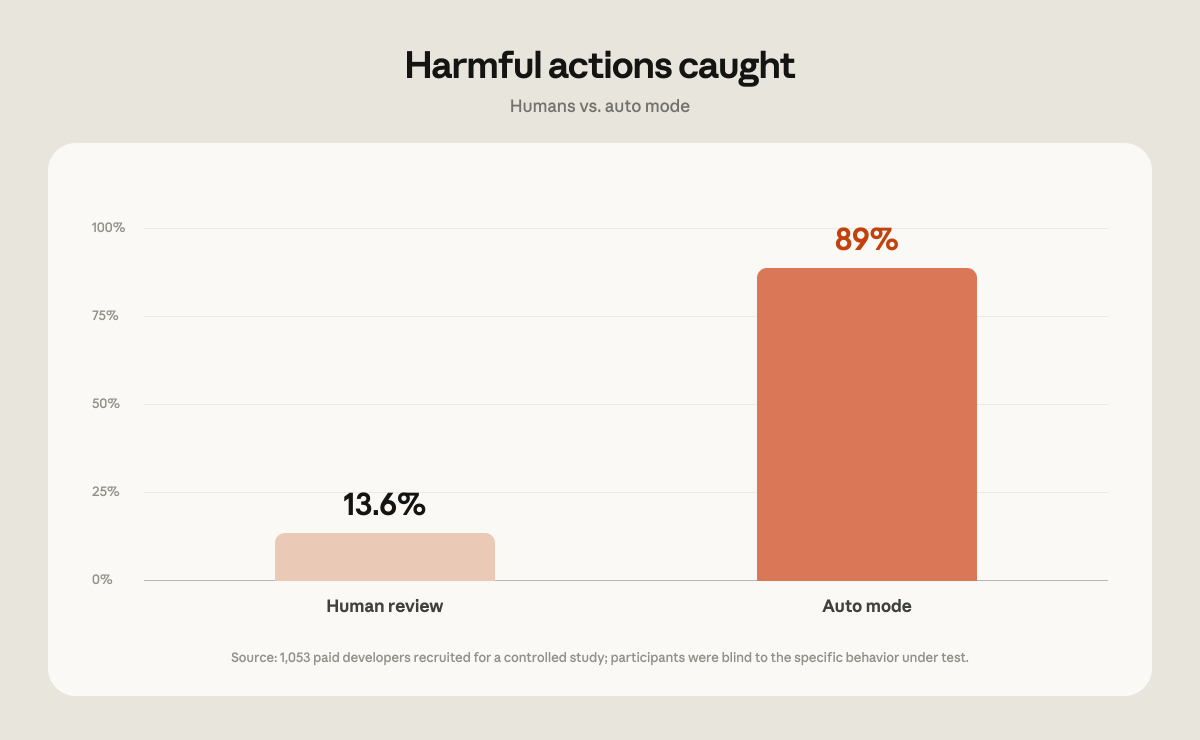
Auto mode sounds less like security and more like outsourcing judgment to the same AI you’re supposedly trying to constrain. If users are bad at spotting malicious prompts, the answer shouldn’t be: great, let’s remove them from the loop entirely. That’s not safety. That’s automated permission laundering.
I just assumed it was to increase token use and create a windfall for Anthropic
So if I remember correctly, what happens with auto mode is they run a second smaller LLM called the “classifier” to evaluate the tool uses of the main one.
I’ve used auto mode at work now for many months, and it approves most things because most things Claude does are reasonable.
Once or twice I have seen it reject Claude. I can’t remember the exact scenario, but I had asked Claude to diagnose an issue but not fix it yet, and when later on it tried to make the change the classifier rejected it, giving the reason that what it was trying to do did not match my request.
In my opinion, the trick to using auto mode safely here is to: